Logitech MK270 vs MK345: which one should you buy?
Both are best-selling, full-size wireless keyboard and mouse combos from Logitech with a single USB receiver, spill-resistant keyboards and batteries that last years. The MK345 adds comfort: a built-in palm rest and a larger contoured mouse.
Quick verdict
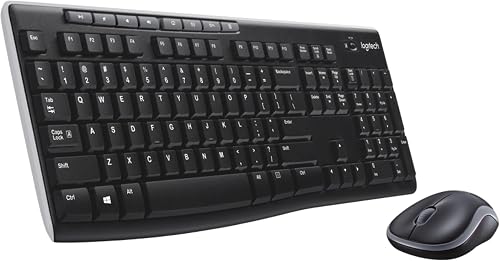
Logitech MK270
Choose the MK270 if you want the cheapest reliable wireless set and don't type for hours every day.
See price on Amazon
Logitech MK345
Choose the MK345 if you type a lot and want a palm rest and a more comfortable mouse.
See price on AmazonSide-by-side comparison
| Feature | Logitech MK270 | Logitech MK345 |
|---|---|---|
| Keyboard | Full size, low-profile quiet keys, number pad | Full size, quiet keys, number pad, palm rest |
| Palm rest | No | Yes, built in |
| Mouse | Compact | Contoured, right-handed |
| Keyboard battery | Up to 36 months | Up to 3 years |
| Mouse battery | Up to 12 months | Up to 18 months |
| Range | Up to 33 ft (10 m) | Up to 10 m |
| Spill-resistant | Yes | Yes |
| Media keys | 8 hotkeys | Media keys |
| Amazon rating | 4.5/5 | 4.5/5 |
Comfort is the difference
The MK345 adds a built-in palm rest and a larger contoured mouse that fills the hand better than the MK270's compact mouse. If you work or study at the computer for hours, that comfort is worth the small extra cost. The MK345 mouse is right-handed only.
Battery and connection
Both use one USB receiver with about 10 m of range and run for years on a set of batteries: up to 36 months for the MK270 keyboard and 12 months for its mouse, versus up to 3 years and 18 months for the MK345. Both need a USB-A port, so USB-C-only laptops need an adapter.
What they have in common
Both are full size with a number pad, spill-resistant and easy to set up with no software, and work with Windows, and the MK345 also lists macOS and ChromeOS.
Which one should you buy?
MK270 is better for
- The lowest budget
- Occasional use or a second desk
- Left-handed users (symmetrical compact mouse)
MK345 is better for
- Long typing sessions
- People who want a palm rest
- A more comfortable right-handed mouse
Frequently asked questions
Do they use Bluetooth?
No, both connect with a single USB receiver.
Does the MK345 mouse work for left-handed people?
It's a right-handed contoured mouse; the MK270's compact mouse is the better option for left-handed users.
How long do the batteries last?
MK270: up to 36 months keyboard and 12 months mouse. MK345: up to 3 years keyboard and 18 months mouse.
How this comparison was made: we compared the manufacturers' official specifications and public Amazon buyer ratings for both products. We haven't tested these units hands-on. Features listed as not specified simply aren't mentioned in the Amazon listing we checked. Check the latest price and details on Amazon before you buy.
Want more options? See all products in our computing buying guide.